Best Trail Camera SD Card Viewer (2026)
Disclosure: This post contains affiliate links. As an Amazon Associate, we earn from qualifying purchases at no extra cost to you.
Contents
- The short answer
- At-a-glance comparison table
- Which viewer should you buy? Decision flowchart
- How we picked these viewers
- 1. Wildgame Trail Pad Tablet VU70 — Best for big-screen viewing
- 2. Stealth Cam 4.3″ SD Card Reader/Viewer — Best touchscreen viewer
- 3. Muddy CRV3 HD SD Card Viewer — Best budget standalone viewer
- 4. Trail Camera Viewer / SD Card Reader for iPhone — Best for iPhone owners
- 5. BoneView SD Card Reader for Android — Best for Android owners
- Card compatibility: the part most buyers get wrong
- What a card viewer really costs
- How to choose a trail camera SD card reader
- Resources hub
- Frequently asked questions
- Final verdict
The short answer: the best trail camera SD card reader
If you want one answer: buy the Wildgame Trail Pad Tablet VU70 if you want a standalone screen you can hand around at camp, buy the Stealth Cam 4.3″ viewer if you want a pocket-size touchscreen, and buy a phone reader — the dual-connector iPhone reader or the BoneView for Android — if you would rather view, save, and share photos on the phone you already carry. The right choice is decided by your phone, not by the viewer: an iPhone reader will not help an Android owner, and a standalone viewer will not help someone who wants to text a buck photo to a hunting partner from the stand. This guide covers the trail camera SD card reader question from the compatibility side first, because a viewer that cannot read your card is a paperweight no matter how good its screen is. Still choosing a card? See our guide to the best SD card for a trail camera.
Three fast choices
- Biggest screen: Wildgame Trail Pad Tablet VU70 — 7-inch touch screen, two SD slots, built-in speaker. Check Price on Amazon →
- Best pocket viewer: Stealth Cam 4.3″ SD Card Reader/Viewer — touchscreen, 1080p playback, wrist lanyard. Check Price on Amazon →
- Cheapest way in: A phone reader — BoneView for Android (USB-C) or the dual-connector reader for iPhone. No batteries, no second screen, nothing to charge. Check Price on Amazon →
The comparison table below lines up all five side by side. Read the compatibility section before you buy: every standalone viewer on this page tops out at 32 GB cards, and that single fact decides more purchases than screen size does.
At-a-glance comparison table: trail camera SD card viewers
| Product | Best for | Screen / display | Card support | Power | Check price |
|---|---|---|---|---|---|
| Wildgame Trail Pad Tablet VU70 | Big-screen viewing at camp; archiving favorite stills | 7-inch HD backlit TFT touch screen | Two full-size SD slots, up to 32 GB each | 4 AA batteries (retailer editorial review); aux and micro-USB ports for TV/computer | Check Price → |
| Stealth Cam 4.3″ SD Card Reader/Viewer | Pocket touchscreen viewing with delete and format | 4.3-inch color LCD touch screen, 5-point touch | Full-size SD up to 32 GB | 4 AAA batteries (retailer listings) | Check Price → |
| Muddy CRV3 HD SD Card Viewer | Low-cost standalone viewing; glove-friendly buttons | 4.3-inch color LCD, 1080p playback | Full-size SD up to 32 GB | 4 AA batteries (retailer listing) | Check Price → |
| Trail Camera Viewer / SD Card Reader for iPhone | iPhone owners who want to import and share from the field | Your iPhone or iPad screen | SD/SDHC/SDXC and microSD slots (generic dual-connector readers) | None — powered by the phone | Check Price → |
| BoneView SD Card Reader for Android | Android owners who want plug-and-play field viewing | Your Android phone or tablet screen | SD/SDHC/SDXC up to 256 GB (manufacturer spec); microSD supported | None — powered by the phone | Check Price → |
One pattern to notice before anything else: the three standalone viewers all stop at 32 GB cards, while the phone readers accept larger cards. That is not a coincidence. Most trail cameras sold in the last decade were built around 32 GB SDHC cards, and the viewers were built to match those cameras. If your camera takes a 64 GB or 128 GB card, a phone reader is the safer buy, and the compatibility section below explains why.
Which viewer should you buy? Decision flowchart
- Step 1 — What phone do you carry? If you carry an iPhone, start with the dual-connector iPhone reader: it covers both Lightning (iPhone 14 and older) and USB-C (iPhone 15 and newer). If you carry an Android phone with USB-C, start with the BoneView. If you do not want to use your phone at all, go to step 2.
- Step 2 — Do you need a screen of your own? If several people will look at photos together at camp, or you do not want to drain your phone battery in the field, buy a standalone viewer. Go to step 3.
- Step 3 — How big a screen do you want? If you want the biggest screen and a second slot for archiving favorite stills, buy the Wildgame VU70. If you want something pocket-size, buy the Stealth Cam touchscreen viewer for swipe-and-zoom control, or the Muddy CRV3 if you prefer physical buttons you can work with gloves on.
- Step 4 — Check your card before you check out. Confirm your camera’s card is a full-size SD card of 32 GB or less if you are buying a standalone viewer. If your camera uses microSD, or a card larger than 32 GB, buy a phone reader instead — the standalone viewers on this page will not read it.
How we picked these trail camera SD card readers
We did not run a lab test, and this guide does not pretend otherwise. What we did was aggregate manufacturer and retailer specifications, camera manuals, and owner reviews from retailer listings, then compare that against what the current search results actually offer. The gap is real: as of the October 2026 live check, the trail camera SD card reader search results are mostly stores (Trailcampro, Moultrie), a Facebook group thread asking which reader to buy, and a single dated affiliate review from 2023. Nobody is answering the compatibility question — which reader works with which phone and which card — and that is the question that causes returns.
Three weaknesses in the existing coverage shaped this guide. First, older roundups rank viewers without ever mentioning the 32 GB ceiling, so buyers with a 64 GB card in a modern camera end up with a viewer that cannot read it. Second, they treat phone readers as one category, when the iPhone/Android split is the whole decision: a USB-C reader is useless on a Lightning iPhone, and a Lightning reader is useless on a USB-C Android. Third, they repeat screen sizes and call it a review, without covering formatting, card speed class, or what to do when a card is not recognized — the three problems owners actually report. We fixed all three, and we left out anything we could not source: you will find no star scores here, because no independent test data exists for these five products, and no prices, because Amazon listing prices change constantly and we could not verify them on a live page at writing time.
What we did not do: invent test results, invent owner experiences, or present manufacturer marketing copy as our own findings. Every specification below traces to a manufacturer page, a retailer listing, or a camera manual, and the owner notes are paraphrased from real retailer reviews, good and bad.
1. Wildgame Trail Pad Tablet VU70 — Best for big-screen viewing

The Wildgame Trail Pad Tablet VU70 is the only viewer on this page that behaves like a small tablet rather than a pocket gadget. Its oversized 7-inch HD backlit TFT touch screen is the headline: photos and videos fill a screen large enough for two or three people to look at together, which is exactly how card checks happen at deer camp. You zoom, swipe, and navigate the way you would on any tablet, and the built-in speaker plays audio on video clips, so you hear the grunt, the footstep, or the hog squeal that the still photo cannot show. Retailer listings describe a heavy-duty, weather-resistant housing, which matters because this is a device that gets used standing in a food plot in November rain, not on a living-room couch.
The second feature is the one that separates the VU70 from every other viewer here: dual, standard-size SD card slots. The primary library slot holds the card from your trail camera with the full set of images and videos. The secondary archive slot holds a second card, and you copy your favorite stills onto it, building a keepers collection — one animal, one stand site, one season — without scrolling through hundreds of images to find the same buck again. Both slots accept cards up to 32 GB each, and the cards are not included. Auxiliary and micro-USB ports let you connect the viewer to a computer or a television for a bigger look at home, though the cords are not included.
✅ Pros
- 7-inch HD touch screen — the largest display on this page, easy to share at camp
- Dual SD slots: library card plus archive card for favorite stills
- Built-in speaker for video audio
- Weather-resistant, heavy-duty housing
- Aux and micro-USB ports for TV or computer viewing
❌ Cons
- Runs on 4 AA batteries with no rechargeable option, per a retailer editorial review — battery cost adds up on heavy video use
- Owner reports say the screen scratches easily and the interface feels slow
- Owner reports say the archive function works one photo at a time and does not archive video
- Full-size SD slots only — owners report microSD cards in adapters are not accepted
- The largest and heaviest viewer here (about 1.43 pounds)
🧑🌾 From the field: Owner feedback on the VU70 is genuinely split, and the split is informative. One owner praised it as rugged and reliable for checking cameras in the woods. Another reported the opposite experience in detail: the unit felt slow, would not accept microSD cards in an adapter, archived only one photo at a time, and did not appear to save video footage to the archive card. A retailer editorial review lines up with the complaints on two points — a fragile, easily scratched screen and limited battery life from 4 AA batteries, which it calls poor value for buyers who check several cameras or watch a lot of video. The honest read: the VU70 is the best big-screen viewer available, but buy a screen protector, carry spare AAs, and do not buy it expecting to archive video clips.
| Spec | Detail |
|---|---|
| Screen | 7-inch HD backlit TFT touch screen |
| Card slots | Two full-size SD slots, up to 32 GB each (cards not included) |
| Video playback | HD video; retailer editorial review reports 1920 × 1080 playback |
| Audio | Built-in speaker |
| Outputs | Auxiliary and micro-USB ports (cords not included) |
| Power | 4 AA batteries per retailer editorial review; no rechargeable battery option reported |
| Housing | Heavy-duty, weather-resistant |
| Size / weight | About 15.16 × 9.49 × 3.62 inches; about 1.43 pounds (retailer listing) |
| Warranty | 1-year manufacturer warranty (retailer listing) |
Verdict: Buy the VU70 if you want the biggest screen and a two-card archive system, and you accept the battery cost and the stills-only archiving limit. Skip it if your cameras run microSD cards — owners report adapter cards are rejected — or if you want a pocket-size tool.
2. Stealth Cam 4.3″ SD Card Reader/Viewer — Best touchscreen viewer
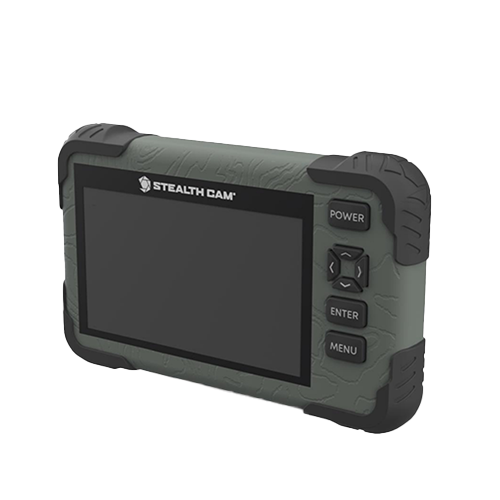
The Stealth Cam 4.3-inch SD Card Reader/Viewer is the pocket-size answer to the VU70. Its 4.3-inch color LCD touch screen uses 5-point touch detection and smart gestures: swipe left and right through images, pinch or gesture to zoom into a rack, and manage files with on-screen view and delete options. Video plays back at 1080p, and a headphone jack lets you listen to audio without playing it out loud at the stand. The housing is rugged and water-resistant with rubberized buttons, and a wrist lanyard keeps the viewer attached to you while you climb, carry a pack, or handle a camera with cold hands.
Two capabilities set the Stealth Cam apart from the cheaper standalone viewers. First, the touchscreen itself: on a button-only viewer you step through menus to zoom; here you gesture, which is faster when you are scanning hundreds of images for one buck. Second, file management goes further than viewing: retailer listings report you can delete individual photos from the viewer, and the specialty retailer Trailcampro confirms you can format the SD card in the viewer itself. That format function is a double-edged tool — it is the fastest way to prep a card for the next deployment, and also the fastest way to erase a season if you format the wrong card — so the compatibility section covers when to use it and when to leave it alone.
✅ Pros
- 4.3-inch color LCD touch screen with 5-point touch and gesture zoom
- 1080p video playback with headphone jack for audio
- Delete individual photos and format cards in the viewer
- Rugged, water-resistant housing with rubberized buttons
- Wrist lanyard included; pocket-size and light
❌ Cons
- SD cards up to 32 GB only — same ceiling as every standalone viewer here
- 4.3-inch screen is small for judging fine detail like tine count at a glance
- Batteries not included, and retailer listings disagree on battery size (see spec table note)
- Micro-USB cable not included
- Touchscreen models cost more than the button-only version of the same viewer
🧑🌾 From the field: Trailcampro lists the Stealth Cam viewer at a 4.1 rating across 11 owner reviews and answers the two questions buyers actually ask: yes, you can delete photos from the viewer, and yes, you can format a card in it. The touchscreen is the feature owners notice first — swipe navigation and zoom are consistently described as the reason to pick this viewer over a button model. The honest limitation is the one shared by all standalone viewers: the 32 GB ceiling. If your camera’s card is larger, this viewer will not read it, touchscreen or not.
| Spec | Detail |
|---|---|
| Screen | 4.3-inch color LCD touch screen, 5-point touch detection |
| Video playback | 1080p HD |
| Card slot | Full-size SD up to 32 GB |
| File management | View, delete individual photos; format card in viewer |
| Audio | Headphone jack; adjustable brightness and volume |
| Connection | Micro-USB (cable not included) |
| Power | 4 AAA batteries per Trailcampro and Freedom USA listings (one retailer listing says 4 AA — confirm on the box before buying spares) |
| Housing | Rugged, water-resistant, rubberized buttons; wrist lanyard included |
| Variants | Touchscreen model STC-CRV43XHD and non-touch model STC-CRV43HD sold separately by some retailers |
Verdict: Buy the Stealth Cam viewer if you want the best pocket-size touchscreen experience and in-viewer delete and format. Make sure you are buying the touchscreen variant (STC-CRV43XHD) if gesture control matters to you, because a cheaper non-touch version of the same viewer exists.
3. Muddy CRV3 HD SD Card Viewer — Best budget standalone viewer
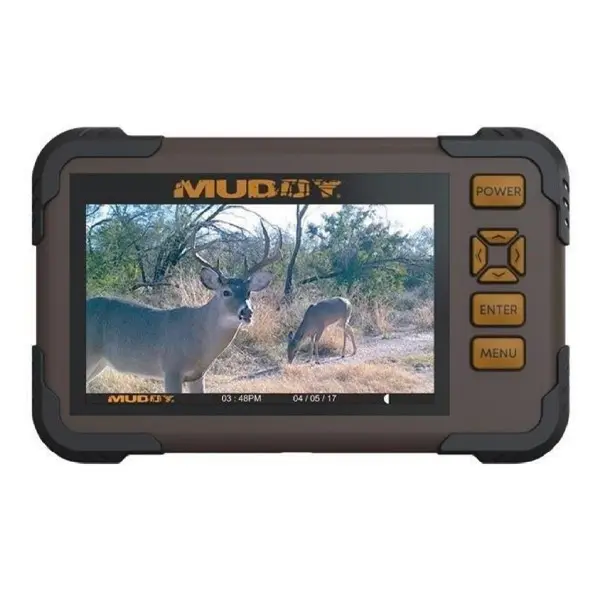
The Muddy CRV3 HD SD Card Viewer covers the same job as the Stealth Cam — view trail camera photos and video in the field without a laptop — with physical buttons instead of a touchscreen, and at a lower price point. Its 4.3-inch color LCD plays 1080p video, and it carries the same practical extras: a headphone jack for audio, adjustable brightness and volume, and view, transfer, and delete options for managing images on the card. The housing is durable and water-resistant, and the menu is designed for quick navigation, which owners confirm is usable with gloves on.
The CRV3’s real selling point is simplicity. There is no touchscreen to learn, no app to install, and no phone battery to drain. You insert the card, scroll, and decide whether the stand is worth hunting. The trade-off is resolution of detail: several owners report that small text and fine detail are hard to judge on a 4.3-inch screen, and one owner specifically notes there is no option to enlarge images the way a touchscreen pinch-zoom allows. That is the honest price of the budget pick — you get reliable viewing, not fine antler scoring.
✅ Pros
- 4.3-inch color LCD with 1080p video playback
- Physical button menu that owners report works with gloves on
- Headphone jack, adjustable brightness and volume
- View, transfer, and delete options on the device
- Durable, water-resistant housing; compact enough to carry easily
❌ Cons
- SD cards up to 32 GB only
- No pinch-zoom: owners report no way to enlarge images beyond the screen
- Some owners report small, fuzzy-looking photos on the 4.3-inch screen
- Batteries not included; retailer listings disagree on AA vs AAA (see spec table note)
- At least one owner report of a dead-on-arrival unit — buy from a retailer with a clear return policy
🧑🌾 From the field: Owner reviews collected on retailer listings give the CRV3 a believable, mixed picture. One owner calls it exactly what every hunter needs in the field — rugged, reliable, quick to read cards, simple to navigate even with gloves, and solid on battery life even in cold weather. Another says it gets the job done and is very easy to operate, while flagging the lack of an enlarge option. On the other side, one owner found photos hard to see, small and fuzzy, and another reported a unit that did not work at all. The balance of evidence says: a dependable, simple viewer whose screen will not flatter your photos, bought at a price that makes the compromise acceptable.
| Spec | Detail |
|---|---|
| Screen | 4.3-inch color LCD |
| Video playback | 1080p |
| Card slot | Full-size SD up to 32 GB |
| File management | View, transfer, delete options |
| Audio | Headphone jack; adjustable brightness and volume |
| Connection | Micro-USB |
| Power | 4 AA batteries per the Amazon product description (one retailer listing says 4 AAA — confirm on the box) |
| Housing | Durable, water-resistant |
| Part number | MUD-CRV43HD (manufacturer GSM Outdoors) |
Verdict: Buy the Muddy CRV3 if you want the simplest, lowest-cost standalone viewer and you are happy judging photos at 4.3 inches without pinch-zoom. If counting tines on the screen matters to you, step up to the Stealth Cam touchscreen or the VU70.
4. Trail Camera Viewer / SD Card Reader for iPhone — Best for iPhone owners
This pick is a category, not a single brand, and that is worth saying plainly: the dual-connector iPhone reader is sold under many names with the same design. What you are buying is a small adapter with two memory slots — one for full-size SD, SDHC, and SDXC cards and one for microSD cards — and two phone connectors, Lightning and USB-C, so one adapter covers both generations of iPhone. Plug the card in, plug the adapter into the phone, and import through the iPhone’s built-in Photos app or browse the card in the Files app. No third-party app is required, and transfer runs both ways: photos and video from the card to the phone, and files from the phone back to the card.
The connector question is the whole purchase. iPhones up to the 14 series use Lightning; iPhone 15 and newer use USB-C. A Lightning-only reader is dead weight on an iPhone 15, and a USB-C-only reader is dead weight on an iPhone 14 — BoneView’s own compatibility page makes exactly this point about its USB-C model, which it states is not compatible with any iPhone before the iPhone 15. The dual-connector design exists to remove that trap, and it is the reason this generic reader, rather than a single-brand Lightning reader, is the iPhone pick on this page. One practical note from Apple’s own behavior, documented in retailer guides: unlike Android, iOS does not pop up an import prompt automatically — you open the Files app, look under Locations, and the card appears there by its volume name.
✅ Pros
- Dual Lightning + USB-C connectors cover iPhone 5 through the newest USB-C models
- Dual slots: full-size SD/SDHC/SDXC plus microSD — no adapter needed for microSD cameras
- No app, no batteries, no internet — powered by the phone, works offline in the field
- Two-way transfer via the built-in Photos or Files app; supports 4K video formats including H.264 and MPEG-4 per retailer listings
- Small and light enough to live in a pack pocket; instant sharing by text or social media
❌ Cons
- Uses your phone battery — a long card review session costs phone charge
- No screen of its own: useless if your phone is dead, broken, or out of charge
- iOS does not auto-prompt on insert — you must open Files manually
- Generic category: build quality varies by seller, so buy from a listing with a clear return policy
- Large video files transfer slowly compared with a dedicated viewer that only plays them
🧑🌾 From the field: Because this is a generic category rather than one branded product, there is no single owner-review pool to quote, and we will not invent one. What retailer listings consistently describe is the same workflow: plug in, open Photos or Files, import what you want, leave the rest on the card. The complaint pattern for generic readers generally is connector mismatch — buyers who ordered a Lightning reader for a USB-C phone or vice versa — which is precisely what the dual-connector design prevents. Check your iPhone’s port before you order, and if you share the reader with a hunting partner, confirm their phone too.
| Spec | Detail |
|---|---|
| Connectors | Lightning and USB-C (dual-connector design with adapter) |
| Card slots | Full-size SD/SDHC/SDXC and microSD/microSDHC/microSDXC |
| Software | None required — iOS built-in Photos and Files apps |
| Transfer | Two-way: card to phone and phone to card |
| Video formats | Per retailer listings: JPEG and RAW photos; H.264 and MPEG-4 video including 4K |
| Power | None — powered by the connected phone |
| Extra port | Some dual-connector models add a USB-A female port for flash drives and USB devices |
Verdict: Buy the dual-connector iPhone reader if you own an iPhone and want the cheapest, lightest way to view and share trail camera photos from the field. Confirm your port type first — Lightning for iPhone 14 and older, USB-C for iPhone 15 and newer — and buy the dual-connector version so the reader survives your next phone upgrade.
5. BoneView SD Card Reader for Android — Best for Android owners
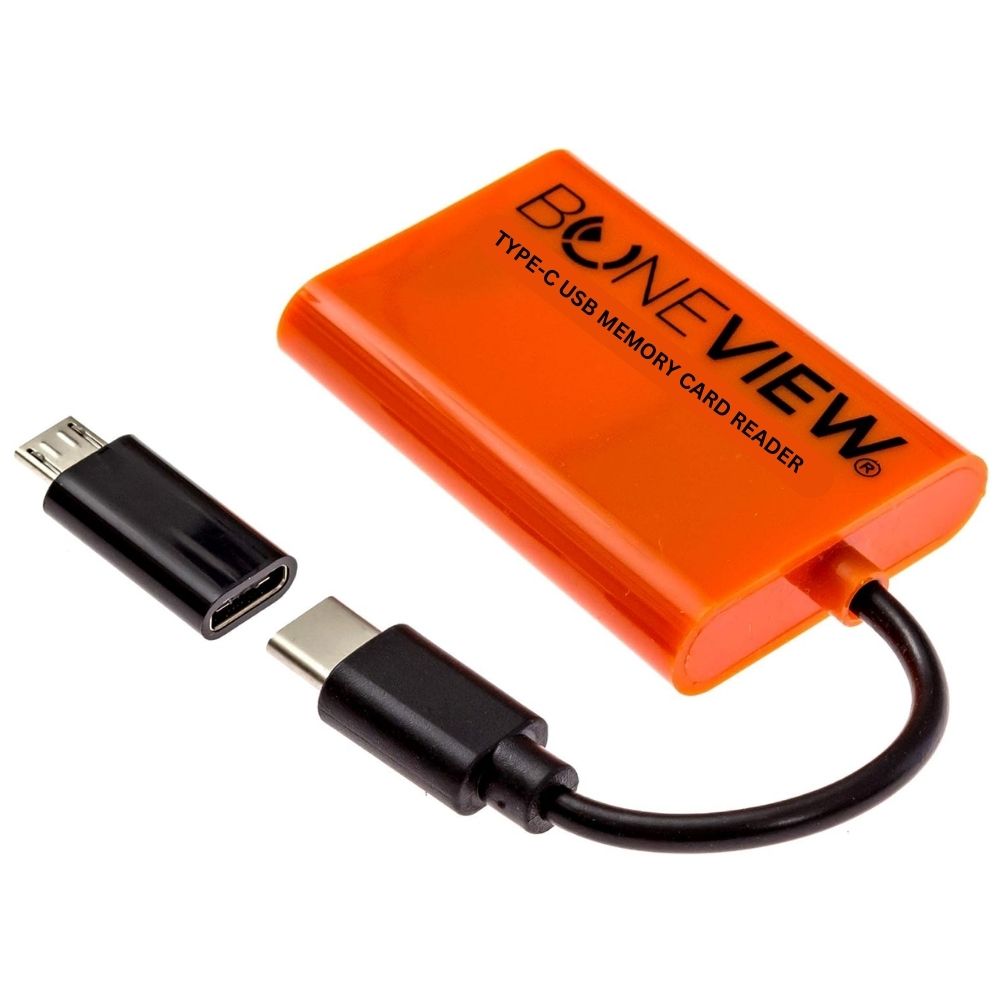
BoneView is the Android counterpart to the iPhone reader, and it is the most purpose-built phone reader on this page: a single product from one maker (model BV-2002, made by Outdoor Performance Gear LLC) designed specifically for hunters checking trail cameras. It connects by USB-C, with a micro-USB OTG adapter included for older Android phones, and it reads both full-size SD cards and microSD cards from every major trail camera brand. The manufacturer states support for SD, SDHC, and SDXC cards up to 256 GB — far above the 32 GB ceiling of the standalone viewers — which makes it the right reader for cameras running large cards. It needs no app, no batteries, and no cell or Wi-Fi signal: plug it in, view, save, share, or delete photos and video directly from the card without importing hundreds of files to your phone first.
The compatibility check for BoneView is different from the iPhone reader’s. Almost all modern Android phones use USB-C, and BoneView’s own compatibility page lists Samsung Galaxy, Google Pixel, Motorola, LG, HTC, and Xiaomi among the supported lines. The real requirement is USB OTG (On-The-Go) support — the phone’s ability to host an external device — and BoneView points buyers to a USB OTG checker app on Google Play to confirm it before ordering. Newer iPads with USB-C ports also work with this reader, per the manufacturer, which is a useful bonus for a household that mixes Android phones and an iPad. BoneView also offers an optional app for fast full-screen swiping, but the reader works without it.
✅ Pros
- USB-C with micro-USB OTG adapter included — covers new and old Android phones
- SD/SDHC/SDXC up to 256 GB per manufacturer spec — no 32 GB ceiling
- Reads SD and microSD from every major trail camera brand
- No app, batteries, or signal required; view, save, share, and delete from the card
- Works with USB-C iPads as well as Android phones and tablets
❌ Cons
- USB-C model is not compatible with iPhones before the iPhone 15 — Android and USB-C iPad only
- Requires USB OTG support — a small number of older or budget Android phones lack it
- Uses your phone battery during long review sessions
- No screen of its own — dead phone means no viewing
- Manufacturer’s own page lists microSD capacity in a way that conflicts with its SD rating (see spec table note)
🧑🌾 From the field: BoneView’s manufacturer states its reader is frequently Amazon’s “Best Choice” selection for Android SD card readers and points to thousands of Amazon reviews — a marketing claim we report as the manufacturer’s, not as a verified count. Independent roundups agree on the core experience: plug the reader into a USB-C Android phone, open the card, and swipe through full-screen photos and video at USB speeds without internet, Wi-Fi, or batteries. The consistent buyer warning is the OTG check: confirm your phone supports USB OTG before ordering, using the checker app BoneView recommends, especially on older or budget handsets.
| Spec | Detail |
|---|---|
| Model | BoneView USB-C Memory Card Reader, model BV-2002 |
| Connectors | USB-C, with micro-USB OTG adapter included |
| Card support | SD/SDHC/SDXC up to 256 GB (manufacturer spec); microSD/microSDHC/microSDXC supported — the manufacturer’s page lists a microSD capacity figure that does not match its SD rating, so treat large microSD cards as check-before-you-rely |
| Software | None required; optional BoneView app for fast full-screen swiping |
| Functions | View, save, share, delete photos and video from the card |
| Phone compatibility | Nearly all USB-C Android phones (Samsung Galaxy, Google Pixel, Motorola, LG, HTC, Xiaomi per manufacturer); USB OTG support required; USB-C iPads also supported |
| Power | None — powered by the connected device |
| In the box | Reader plus micro-USB OTG adapter; some bundles add a zipper case |
Verdict: Buy the BoneView if you carry an Android phone and want the fastest, lightest field viewer with no 32 GB ceiling. Run the USB OTG check on your phone first, and keep the micro-USB adapter in the case — it is the part that saves an older phone from being left out.
Card compatibility: the part most buyers get wrong
A trail camera SD card reader is only as good as its match to three things: the card type your camera writes, the card size your viewer reads, and the phone or port you plug into. Get any one wrong and the viewer is useless. This section works through each one with the manual and manufacturer facts behind it.
Card type and capacity: read your camera’s manual first
Trail cameras do not agree on cards. Moultrie’s manuals are consistent: use SDHC Class 10 SD cards up to 32 GB, and the camera will not operate without a card installed. The Moultrie A-series manual adds two warnings worth heeding — turn the camera off before inserting or removing a card, and ultra/turbo SD cards are not recommended. Browning is the exception that proves the rule: the Browning Strike Force HD manual lists removable memory up to 512 GB, far beyond the 32 GB world that Moultrie and the standalone viewers live in. The lesson is simple and non-negotiable: the card your camera accepts is defined by your camera’s manual, not by your viewer. A viewer that reads up to 32 GB cannot read a 64 GB card from a Browning, and a phone reader rated to 256 GB cannot fix a camera that only accepts 32 GB cards. Match the card to the camera first, then match the viewer to the card.
Speed class matters more than most buyers think. Moultrie specifies Class 10, which is the minimum sustained write speed for reliable video capture. A slow card in a camera set to video can drop frames or fail to save clips entirely, and the symptom looks exactly like a camera fault when it is really a card fault. Buy Class 10 or faster (UHS-I Class 10 is the common shelf label), and if a card has been used in several cameras, format it in the camera it will live in before the season — formatting in the camera writes the file system the camera expects.
How many photos fit? Real storage estimates from a camera manual
Marketing numbers for card capacity are vague, so here are real ones from Browning’s own SD card selection chart for the Strike Force HD, which the manual notes will vary with actual image properties:
| Setting | 8 GB card | 16 GB card | 32 GB card |
|---|---|---|---|
| Photos at 22 MP | 1,500 | 3,000 | 7,000 |
| Photos at 8 MP | 3,600 | 7,200 | 14,000 |
| Photos at 4 MP | 7,300 | 14,000 | 28,000 |
| Photos at 2 MP | 14,000 | 25,000 | 50,000 |
| 20-second video, ultra resolution | 70 clips | 140 clips | 280 clips |
| 20-second video, high resolution | 126 clips | 240 clips | 480 clips |
Two practical conclusions fall out of that table. First, a 32 GB card holds far more than most hunters check in one visit — 7,000 photos at full 22 MP resolution is several weeks of triggers on a normal stand. Second, video is what fills cards: a camera set to 20-second high-resolution clips holds under 500 clips on 32 GB, so a camera on a busy trail or feeder can fill a card in days, not weeks. If your camera is video-heavy, that is the argument for a larger card and a phone reader that can read it, rather than a standalone viewer capped at 32 GB.
Formatting: where, when, and what never to do
Format a card in the camera it will be used in, not in your computer and not in a viewer, whenever you have the choice. Camera formatting writes the exact file system and folder structure the camera expects, which is why Moultrie manuals describe inserting a formatted card as part of setup. Viewer formatting exists — the Stealth Cam viewer can format a card in the device — and it is useful for one job: clearing a card in the field so it can go straight back into a camera. It is dangerous for a different reason: formatting erases everything, including the one photo you had not looked at yet. The safe field routine is: view first, save the keepers to your phone or to the VU70’s archive card, and only then format. Never format a card you have not reviewed, and never format a card in a viewer if you are unsure whether the viewer formats to a file system your camera accepts — when in doubt, format in the camera.
One more formatting trap: cards over 32 GB use exFAT, while 32 GB and smaller SDHC cards use FAT32. Most trail cameras built around 32 GB expect FAT32. A 64 GB card formatted to exFAT on a computer will not work in a camera that only reads FAT32, and some older cameras will report it as a missing or bad card. If a camera refuses a large card, the file system is the first suspect, not the card brand.
iOS vs Android: the phone split that decides phone readers
iPhone readers and Android readers are not interchangeable, and the split runs on connectors. iPhones through the 14 series use Lightning; iPhone 15 and newer use USB-C. Android phones overwhelmingly use USB-C, with older models on micro-USB. The dual-connector iPhone reader on this page covers both iPhone generations. The BoneView covers USB-C Android plus micro-USB Android via its included OTG adapter, and USB-C iPads, but not Lightning iPhones. Before ordering any phone reader, check three things: your phone’s port type, whether your Android phone supports USB OTG (BoneView recommends a checker app for this), and whether your camera’s card is full-size SD or microSD — phone readers with dual slots cover both, standalone viewers do not cover microSD at all.
Error symptoms and what they usually mean
| Symptom | Most likely cause | What to try first |
|---|---|---|
| Viewer says no card / card not recognized | Card larger than the viewer’s 32 GB limit, or wrong file system (exFAT in a FAT32-only device) | Check the card size against the viewer spec; reformat in the camera |
| Camera will not operate with the card in | Card not formatted, or a card type the camera rejects (Moultrie warns against ultra/turbo cards) | Format the card in the camera; try a Class 10 SDHC card of 32 GB or less |
| Viewer will not accept a microSD card in an adapter | Some viewers reject adapter cards — VU70 owners report exactly this | Use a phone reader with a native microSD slot, or a full-size SD card in the camera |
| Phone does not see the reader | Wrong connector (Lightning vs USB-C), or Android phone without USB OTG support | Match the connector to the phone; run a USB OTG checker on Android |
| Photos look small or fuzzy on the viewer | 4.3-inch screen limits, reported by Muddy CRV3 owners; or low camera resolution setting | Use pinch-zoom on a touchscreen viewer, or view on your phone; check the camera’s megapixel setting |
| Card fills in days | Video mode on a busy trail; 20-second high-resolution clips fill 32 GB in under 500 clips | Shorten clip length, lower resolution, or move to a larger card with a phone reader |
| Viewer is slow scrolling through images | Large card, many video files, or weak batteries in a battery-powered viewer | Fresh batteries; archive or delete obvious junk files first; use a phone reader for big cards |
What a trail camera SD card viewer really costs
The viewer is the cheapest part of the system. The real cost is everything around it: cards, batteries, and the phone you already own. This table uses what owners report, not list prices, because prices change and we do not publish unverified figures.
| Cost item | What owners report | Notes |
|---|---|---|
| Standalone viewer (VU70, Stealth Cam, Muddy) | One-time purchase; the VU70 is the most expensive of the three, the Muddy the least | Check current retailer pricing at purchase — we do not publish prices we cannot verify live |
| Phone reader (iPhone dual-connector, BoneView) | One-time purchase, lowest cost of all five options | No batteries, no screen, no charger to buy |
| SD cards | Cards are not included with any viewer on this page | Budget for at least two cards per camera: one in the camera, one spare or one archive card |
| Batteries | VU70: 4 AA per use cycle; Stealth Cam: 4 AAA; Muddy: 4 AA | Owners report battery cost as the VU70’s main running expense; rechargeable AAs cut it sharply |
| Screen protector (VU70) | Owner-reported fragile screen | Cheap insurance given the scratch complaints |
| Cables | Aux and micro-USB cords not included with the VU70; micro-USB cable not included with the Stealth Cam | Only needed if you plan TV or computer viewing |
The takeaway: a phone reader costs the least over a season because it has no consumables at all. A standalone viewer costs more to run, and the VU70 costs the most, because 4 AA batteries on heavy video use add up — the retailer editorial review makes exactly this point. If you check cameras weekly through a season, rechargeable batteries pay for themselves in the first month on any battery-powered viewer.
How to choose a trail camera SD card reader
Standalone viewer or phone reader?
Buy a standalone viewer if you check cameras with other people, if you do not want to burn phone battery in the field, or if your phone is your lifeline and you will not risk it in rain and mud. Buy a phone reader if you want to save and share photos immediately, if you carry one phone and nothing else, or if your camera uses cards larger than 32 GB. Most serious hunters end up with both eventually: a phone reader for daily checks and a standalone viewer for camp. If you buy one first, buy the phone reader — it is cheaper, has no batteries, and reads the most cards.
What screen size do you actually need?
A 4.3-inch screen is enough to answer the question “is this stand worth hunting?” — you can see species, rough size, and time stamps. It is not enough to count tines reliably, which is why owners report squinting at Muddy CRV3 photos and why the Stealth Cam’s pinch-zoom matters. A 7-inch screen answers the tine question and lets a group look together, at the cost of weight and battery appetite. Match the screen to the decision you make in the field: presence versus scoring.
Which card system are you already invested in?
Count your cards before you buy a viewer. If every camera you own runs full-size 32 GB SDHC cards, any viewer on this page works. If any camera runs microSD — directly or in an adapter — standalone viewers are a gamble: VU70 owners report adapter cards rejected outright. If any camera runs 64 GB or larger, only the phone readers work. Your existing cards decide the viewer more than any feature list does.
What about cellular cameras and app control?
Cellular trail cameras send photos to your phone without any card handling at all, and if most of your cameras are cellular, a viewer is a backup tool, not a daily tool. Our guide to deer feeders with camera and app control covers the camera-and-app side of that setup, including Moultrie Bluetooth versus cellular control and Feed Hub compatibility. The viewers on this page still earn their place for non-cellular cameras, for cameras in dead zones, and for the full-resolution originals that cellular plans compress before sending.
Resources hub
- Best Deer Feeder with Camera & App Control — cellular vs Bluetooth control, Feed Hub compatibility
- Best Tripod Deer Feeders — stable, high-capacity picks for camera-and-feeder setups
- Best Deer Feeders 2026 — the main 16-feeder roundup
- Best Gravity Deer Feeders — 10 models compared
- Best Automatic Deer Feeders — 7 timed feeders compared
- Best Deer Feeder Timer — replacement timer checks
- Deer Feeder Solar Panel — 6V and 12V power matching
- Deer Feeder Batteries — 6V and 12V picks, charging without mixing voltages
- Best Deer Feeder Parts & Accessories — motors, timers, batteries, solar
- Best Protein Deer Feeders — 7 models with evidence and trade-offs
- Best Corn Feeders for Deer — corn feeder choices and buying guide
- Deer Feeder Not Working? — diagnose power, motor, and timer faults in order
- DIY 55-Gallon Drum Deer Feeder — complete build guide
- PVC Deer Feeder — gravity tube build guide
- Deer Feeding Times Chart — 7 checks for a local chart
Frequently asked questions about trail camera SD card readers
What is the best trail camera SD card reader?
The best trail camera SD card reader depends on your phone. For a standalone screen, the Wildgame VU70 has the biggest display and a two-card archive system. For a pocket touchscreen, the Stealth Cam 4.3-inch viewer adds gesture zoom, delete, and in-viewer formatting. For phone viewing, the dual-connector iPhone reader suits iPhone owners and the BoneView suits Android owners — both are cheaper than any standalone viewer and have no batteries to buy.
Will a trail camera SD card viewer read a 64 GB card?
The standalone viewers on this page will not: the Wildgame VU70, Stealth Cam viewer, and Muddy CRV3 all top out at 32 GB cards. Phone readers are the answer for larger cards — the BoneView is rated by its manufacturer for SD cards up to 256 GB, and generic dual-connector iPhone readers accept SDXC cards. Check your camera’s manual first, because some cameras only accept 32 GB cards themselves.
Can a trail camera viewer read microSD cards?
Standalone viewers generally cannot: they have full-size SD slots only, and VU70 owners report that microSD cards in adapters are rejected. Phone readers with dual slots read both full-size SD and microSD natively, which is the reliable route for microSD cameras.
Do I need an app to use a trail camera SD card reader on my phone?
No. iPhone readers work through the built-in Photos and Files apps, and the BoneView works without an app on Android. BoneView offers an optional app for fast full-screen swiping, but it is not required. On iOS, remember to open the Files app manually — iOS does not show an automatic import prompt when a reader is connected.
What size SD card should I use in a trail camera?
Follow your camera’s manual. Moultrie manuals specify SDHC Class 10 cards up to 32 GB, and the camera will not operate without a card installed. Browning’s Strike Force HD manual allows removable memory up to 512 GB. A 32 GB card holds about 7,000 photos at 22 MP or about 480 twenty-second high-resolution video clips, per Browning’s own capacity chart — enough for weeks of photos, but video-heavy cameras fill cards much faster.
Should I format my trail camera SD card in the viewer or the camera?
Format in the camera whenever you can: camera formatting writes the file system and folder structure that camera expects. Viewer formatting — available on the Stealth Cam viewer — is fine for clearing a card in the field, but only after you have viewed and saved the keepers, because formatting erases everything. Never format a card you have not reviewed.
Why does my trail camera viewer say the card is not recognized?
The most common causes are a card larger than the viewer’s 32 GB limit, a file system mismatch (a 64 GB exFAT card in a device that expects FAT32), or an unformatted card. Try a 32 GB or smaller Class 10 SDHC card formatted in the camera. If the card is microSD in an adapter, try a phone reader with a native microSD slot instead.
Can I delete photos from a trail camera SD card viewer?
Yes, on the viewers that support it. The Stealth Cam viewer deletes individual photos and can format the whole card, and the Muddy CRV3 offers view, transfer, and delete options. Phone readers delete through your phone’s Photos or Files app. The Wildgame VU70 archives favorite stills to a second card one photo at a time, and owner reports say it does not archive video.
Does a trail camera SD card viewer need batteries?
Standalone viewers do: the Wildgame VU70 runs on 4 AA batteries, the Stealth Cam viewer on 4 AAA batteries per retailer listings, and the Muddy CRV3 on 4 AA batteries per its product description — none include batteries, so budget for spares or rechargeables. Phone readers need no batteries at all; they draw power from the phone.
Can I view trail camera photos on my iPhone without a computer?
Yes. A dual-connector SD card reader plugs into your iPhone and imports photos and video through the built-in Photos app or the Files app, with no computer and no third-party app. Use the Lightning connector for iPhone 14 and older and USB-C for iPhone 15 and newer; a dual-connector reader covers both.
What is the difference between the Stealth Cam touchscreen and non-touchscreen viewers?
Both are 4.3-inch viewers with 1080p playback, but the touchscreen model (STC-CRV43XHD) adds 5-point touch detection and smart gestures for swiping and zooming, while the non-touch model (STC-CRV43HD) uses buttons. Some retailers sell both, so confirm the model number if gesture control matters to you.
Do I still need a card viewer if my trail camera is cellular?
Not for daily checks — a cellular camera sends photos to your phone on its own. A viewer still earns its place for non-cellular cameras, for cameras in areas without signal, and for viewing full-resolution originals, since cellular plans compress photos before sending them.
Final verdict
If you only buy one trail camera SD card reader, buy a phone reader first: the dual-connector reader for iPhone or the BoneView for Android. They cost the least, need no batteries, read the widest range of cards, and turn the phone already in your pocket into the viewer. Buy a standalone viewer second, for camp and for company: the Wildgame VU70 if you want the biggest screen and a two-card archive, the Stealth Cam touchscreen if you want pocket-size gesture control with delete and format, or the Muddy CRV3 if you want the simplest button viewer at the lowest cost. Whichever you choose, check your card against the compatibility section before you order — a viewer that cannot read your card helps no one, and that check takes thirty seconds.
Check the price and availability of your pick here: Wildgame VU70 · Stealth Cam viewer · Muddy CRV3 · iPhone reader · BoneView for Android.
Last updated: October 25, 2026.
Products mentioned in this guide
Wildgame Innovations Trail Pad Tablet VU70
Check Price on Amazon →Confirm price and availability on AmazonStealth Cam SD Card Reader & Viewer
Check Price on Amazon →Confirm price and availability on AmazonBoneView SD Card Reader for Android
Check Price on Amazon →Confirm price and availability on AmazonMuddy CRV3 HD SD Card Viewer
Check Price on Amazon →Confirm price and availability on AmazonSee this product on Amazon
Check Price on Amazon →Confirm price and availability on AmazonAs an Amazon Associate, we earn from qualifying purchases.