
Best Deer Feeder Timer: 7 Powerful Replacement Checks
A practical buying guide for US feeder owners · Research checked October 10, 2026
The best deer feeder timer is the one that fits your exact feeder kit, operates with its specified power system, and gives you controls you can reliably check. A screen with more buttons is not automatically an upgrade. Neither is a product advertised as universal. Before ordering, identify the kit under your hopper, verify electrical and physical compatibility, and work out whether the timer is actually the part that needs replacement.
If your feeder stopped running before a trip to the property, you probably want a straightforward answer: should you buy a replacement timer, a battery, a motor, or a complete kit? This guide starts with that decision. It then compares two documented timer options, explains the difference between Bluetooth and cellular operation, and provides a replacement checklist that you can use beside the feeder. The objective is to help you buy a useful part rather than send you through a collection of unrelated accessories.
Quick answer: For a supported Moultrie kit, shortlist the Moultrie Universal Digital Timer III, MFG-15095, particularly if local Bluetooth control matters. For a suitable Wildgame Innovations power control unit, shortlist the Trophy Hunter Digital Timer, WGI-WGITM0003, if you prefer conventional digital scheduling. Neither recommendation establishes cross-brand compatibility. Confirm the exact kit, voltage, connections, housing fit and retained features before purchase.
Affiliate disclosure: As an Amazon Associate, BestDeerFeeders.com earns from qualifying purchases. The Amazon buttons in this guide contain our affiliate tag. They open product searches so you can compare available listings; they do not guarantee that the first result is the correct model. Check the model number and seller details before ordering.
Compare the deer feeder timer that fits your routine
Choose a replacement for the job you need it to do. These are conditional shortlists, not a claim that either timer fits every feeder.
FOR SUPPORTED MOULTRIE KITS
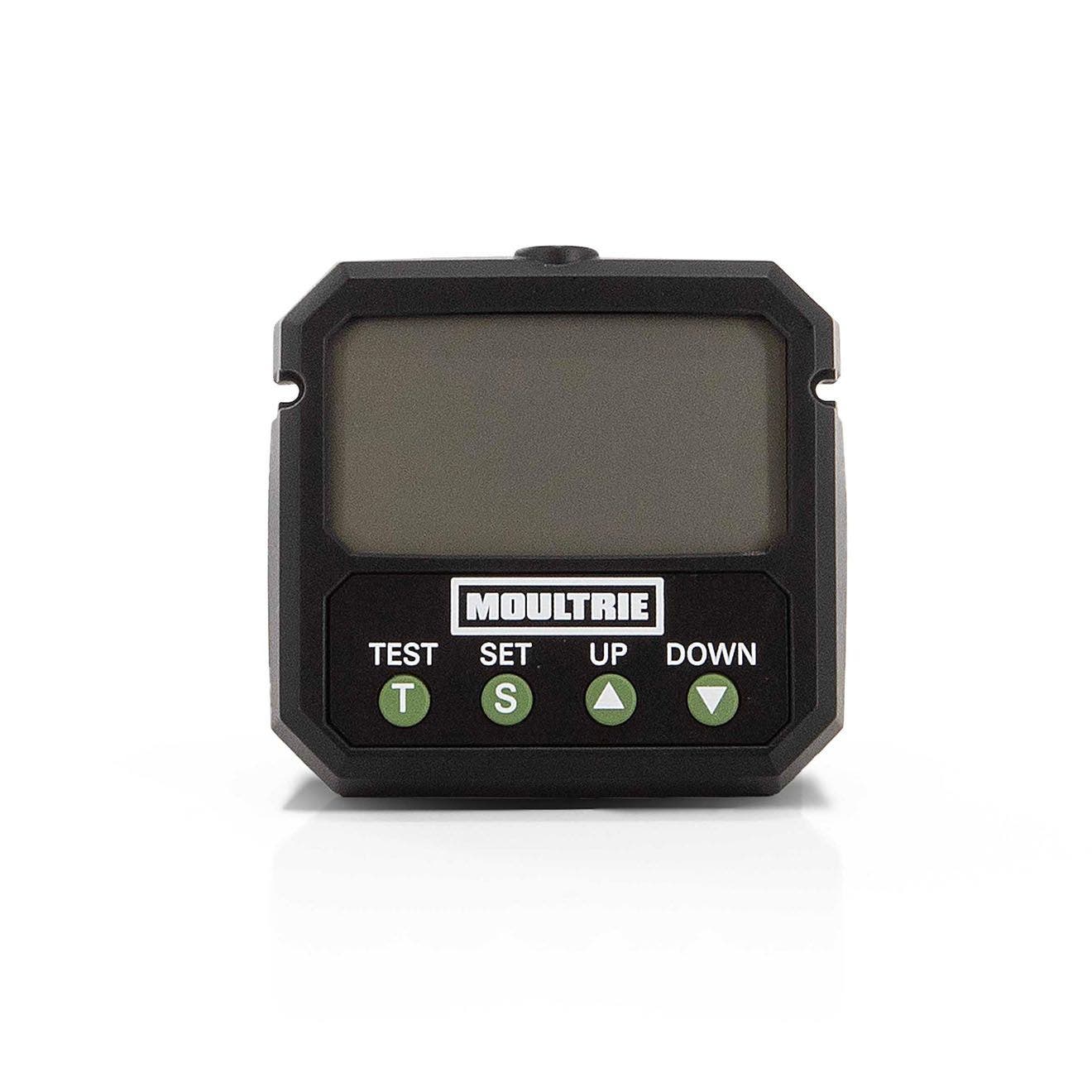
Want local phone control?
Moultrie Universal Digital Timer III
Shortlist for a supported upgrade when nearby app control makes servicing easier.
Before you order: verify kit fit and the NXT guard tradeoff. Product and support pages use MFA-15095 / MFG-15095 labels; confirm the exact item.
FOR COMPATIBLE WILDGAME UNITS
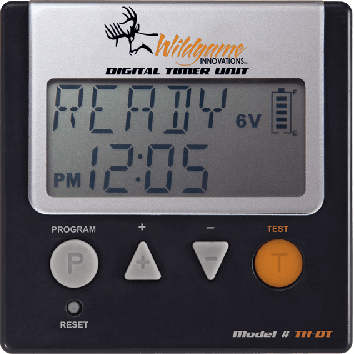
Prefer conventional controls?
Wildgame Trophy Hunter Digital Timer
Shortlist when ordinary scheduling meets your needs and the installed power control unit is compatible.
Before you order: match SKU WGI-WGITM0003, connectors and housing. Bluetooth support is not established by its reviewed product page.
| Choose by your actual need | Moultrie Universal Digital Timer III | Wildgame Trophy Hunter |
|---|---|---|
| Best reason to shortlist | Local app control on a supported kit | Conventional scheduling on a compatible unit |
| Controls | Built-in interface + nearby Bluetooth | Digital interface + test button |
| Manufacturer-listed scheduling | Up to 10 daily events; 1–60 seconds* | Up to 6 daily events; 1–30 seconds |
| Power | 6V / 12V support; match the full kit | 6V / 12V unit support; confirm fit |
| Buying caution | Verify generation, connectors and retained functions | Confirm installed unit, connectors and mounting |
| Your next step | Check Moultrie offers → | Check Wildgame offers → |
*Moultrie’s current product page lists 10 events and 1–60-second runs. Some support instructions conflict, so confirm the exact manual before programming. Manufacturer specifications. Amazon buttons open tagged searches; confirm the exact listing before ordering.
Real owners: useful successes and buying cautions
MOULTRIE · POSITIVE REPORT
Timothy J. — retailer-displayed owner review
Reported satisfaction with app, EDGE 3 and on-demand operation. The retailer labels this review as originally posted on Moultrie.
Buyer takeaway: the connected features can be useful, but this report does not guarantee your range or kit fit.
MOULTRIE · REPORTED PROBLEM
Railrunnet — Alvord, Texas
Reported difficulty creating an app account because the verification email arrived too late. This is an account-access complaint, not a confirmed mechanical failure.
Buyer takeaway: complete account setup before a property trip if app control is part of your plan.
WILDGAME · MIXED OWNER REPORTS
eBay product-review section
A May 2020 reviewer described easy programming while saying long-term durability was still unknown. A December 2024 reviewer reported a short indication and unsatisfactory operation.
Buyer takeaway: confirm compatibility, test scheduled operation and retain return options. The listing groups product reviews; generation equivalence is not independently verified.
These are attributed owner reports, not our field tests or a statistically representative reliability survey. Individual results and grouped retailer reviews cannot establish a failure rate.
Watch the manufacturer product video
This video is embedded on Moultrie’s Universal Digital Timer III product page. It is manufacturer-selected product material, not an independent review. Open the video on YouTube · View its manufacturer source. Use the current manual for your exact kit; no installation claim here is based on an unverified transcript.
In this buying guide
- Start here: which replacement path fits your situation?
- 1. What a deer feeder timer does—and what it cannot fix
- 2. The seven checks that matter before a timer replacement
- 3. Moultrie Universal Digital Timer III: shortlist for supported Moultrie upgrades
- 4. Wildgame Innovations Trophy Hunter Digital Timer: shortlist for conventional scheduling
- 5. Compare the two options without inventing an overall winner
- 6. Diagnose the problem before ordering a timer
- 7. What a real owner report tells us—and what it does not
- 8. Bluetooth, cellular control and ordinary scheduling are different purchases
- 9. If your Moultrie feeder Bluetooth is not connecting
- 10. A replacement workflow that keeps the job understandable
- 11. Choose useful schedule controls without treating more events as better
- 12. Timer-only repair versus a complete feeder kit
- 13. Work out the real value of the purchase
How this guide was prepared: We reviewed manufacturer product and support pages and an attributed public owner discussion. We did not field-test these timers, measure their durability, or verify a failure rate. Recommendations are conditional buying judgments based on documented features and fit requirements. Prices, availability and seller bundles can change. There are no invented star ratings, anonymous expert testimonials or claims that a timer guarantees more deer activity.
Start here: which replacement path fits your situation?
| Your situation | Start with | What to establish before buying |
|---|---|---|
| Supported Moultrie kit; want local phone control | Universal Digital Timer III | Exact kit support, wiring, housing fit and any feature tradeoff |
| Wildgame Innovations power control unit; want conventional scheduling | Trophy Hunter Digital Timer | Exact unit compatibility, power specification and connectors |
| Existing timer lights up but motor does not run | Diagnosis before a timer order | Battery condition, connections, obstruction and motor operation |
| Timer tests successfully but scheduled runs are missed | Clock and schedule checks | Saved times, active mode, enabled days and normal scheduled operation |
| Damaged housing, wiring and motor as well as timer | Compare a complete compatible kit | Total repair cost, mounting requirements and condition of retained parts |
| American Hunter or another brand | Model-specific replacement guidance | Manufacturer-confirmed timer part number; do not assume either option above fits |
Before clicking a buying button, photograph the feeder kit label. A hopper capacity such as 30 gallons or 200 pounds is useful for identifying the overall feeder, but it may not identify the electronic assembly underneath it. A previous owner could have changed that assembly. The label on the component you are replacing is the starting point for a dependable order.
1. What a deer feeder timer does—and what it cannot fix
A timer controls when a powered feeder operates and how long the programmed release lasts. The exact controls vary between products. Some use a conventional display and buttons; others also offer an app. Those controls are only one part of the system. The timer needs appropriate power, the motor needs to operate, and the feed needs to reach the mechanism without an obstruction. A failure anywhere along that chain can look like a timer problem from a distance.
Consider a feeder that still contains most of its corn after several expected releases. It is tempting to order a timer because the feeder did not run as expected. Yet the same observation can arise from a battery connection problem, a motor fault, a blockage, or a schedule that was never saved. Buying electronics before checking those possibilities can leave the original fault in place. Your first task is to describe the symptom precisely: blank display, incorrect clock, failed test, missed scheduled run, or motor operation without normal feed discharge.
A new timer also cannot make an incompatible motor suitable for a different voltage, repair a damaged hopper lid, or certify questionable corn as usable. Nor does its schedule determine whether feeding or baiting is permitted where you operate. Keep equipment control separate from wildlife management and current local rules. This article is a parts-selection guide for lawful, appropriate use, not a recommendation to start feeding wild deer.
It helps to write a short problem statement before shopping. For example: “The display remains on, the saved clock is correct, but two enabled scheduled runs were missed.” That statement is far more useful to manufacturer support than “my feeder is broken.” It also helps you avoid paying for a feature that does not address the issue. If the actual problem is inconvenient access to a working timer, an app-capable replacement may be relevant. If the problem is water entering the enclosure, better controls alone will not solve it.
2. The seven checks that matter before a timer replacement
Check 1: identify the actual feeder kit and generation
Record the brand, kit model, timer model and any visible part number. Include photographs of the front of the timer and the label on the assembly. If the writing has faded, look for an order confirmation, original manual or recognizable housing details. Ask support to identify the unit when the evidence is incomplete. Do not silently replace an uncertain model with the nearest-looking product name from a marketplace listing.
Product generations matter because a familiar brand name can cover different connectors, programming controls and accessory arrangements. A timer that belonged to a previous version may share part of its name with a current replacement without being the same part. Similarly, the presence of a timer inside a branded hopper does not prove it was supplied with that hopper. Owners often replace kits over the years. Treat the current installed assembly as the object of the compatibility check.
Check 2: verify the entire power specification
Write down the specified voltage and battery arrangement for your exact kit. Then compare them with the proposed replacement’s instructions. A timer described as supporting both 6V and 12V does not make every connected component suitable for either voltage. The motor, charging equipment and retained accessories still have their own requirements. Match the system rather than reading one number on one listing and considering the electrical question settled.
Avoid choosing a higher voltage because a motor seems slow or a battery seems weak. That is a troubleshooting question, not an upgrade method. If your battery is unsuitable or depleted, a different timer may behave poorly for the same reason. Our 6V and 12V deer feeder battery guide provides a separate buying reference. Use it alongside the kit instructions and verify the exact battery type, terminals and dimensions before ordering.
Check 3: compare connectors and wiring requirements
Inspect the connections without treating wire color as a complete wiring diagram. Record connector shape, terminal arrangement and how the motor and battery connect to the existing timer. Compare those details with the replacement’s documentation. If a seller says an adapter is included, establish what that adapter actually connects and whether the manufacturer approves the arrangement for your equipment.
Do not turn a vague universal-fit claim into permission to cut and splice wires. Some historical product instructions describe particular wiring modifications for particular parts, but that does not establish a procedure for a different timer. Unsupported changes can complicate returns, troubleshooting and enclosure protection. Where the documentation does not settle the connection, send clear photographs to the manufacturer and ask for a confirmed compatible part or approved installation method.
Check 4: make sure the timer fits and the housing closes
A replacement can be electrically suitable and still create a practical problem inside the enclosure. Compare mounting points, cable routing, display access and clearance around the battery. The housing must close as intended without pinching leads or forcing the timer into place. Make sure you can reach the controls and read the display using the normal service arrangement.
Avoid assessing fit only from the front photograph. Depth and connector position can be just as important as the outline of the screen. If dimensions are not published, ask before buying. A slightly cheaper timer is poor value if it requires an improvised enclosure that no longer protects the assembly as designed. Retaining the original housing is useful only when the replacement can be installed and serviced correctly within it.
Check 5: identify features you could lose
List everything the old system does before removing its timer. Include guards, sensors, remote functions and any controls built into the kit. Then check what the replacement retains. This is particularly important when an upgraded electronic module changes how other components operate. A new phone-control feature is not automatically worth losing an existing function that matters on your property.
One specific example appears in Moultrie’s Universal Digital Timer III support page: its compatibility list includes the NXT Series, but notes that the varmint guard will no longer function after the original timer is replaced. That is a significant buying tradeoff, not a footnote to ignore. Confirm what the warning means for your exact kit before purchase. A separate physical cage should not be assumed to restore the lost feature without further compatibility checks. Source: Moultrie timer setup page.
Check 6: choose controls you will actually use
Think through a routine service visit. Can you read the screen? Can another person understand the saved schedule? If you want app control, will the person who services the feeder have the appropriate phone and account access? A feature that works well for one owner may create confusion for another. Select the interface that fits the people operating the equipment, not simply the most elaborate feature list.
Also separate local convenience from remote monitoring. Bluetooth can be useful when you are near the feeder, but that is a different requirement from managing it while away from the property. Write your desired outcome in plain language: “I want to change times while standing nearby,” or “I need to manage settings from home.” Those two requirements can lead to different hardware, connectivity and ongoing costs.
Check 7: verify the listing, return terms and complete cost
Compare the exact model number in the seller’s listing with the documentation you used. Check whether the offer is a timer alone, an entire kit, or a bundle containing accessories you already own. Look for meaningful photographs, a clear description of included parts and a return policy that suits a compatibility-sensitive purchase. Do not assume that identical product titles mean identical contents.
Calculate the delivered cost rather than comparing the most prominent price alone. Shipping, needed adapters and an appropriate battery can change the decision. So can a service trip made specifically to discover that the part does not fit. The best-value choice is the one that resolves the identified problem with a supported installation. Saving a few dollars on the wrong item is not a useful saving.
3. Moultrie Universal Digital Timer III: shortlist for supported Moultrie upgrades
Manufacturer product photograph. Appearance does not establish fit for your installed kit.
The Universal Digital Timer III, MFG-15095, is the documented Moultrie option to investigate when you want a replacement that adds local phone control to a supported kit. Moultrie’s setup page describes compatibility with several named kit families and support for 6V and 12V feeders. It also separates local Bluetooth operation from remote cellular operation through compatible additional equipment. These are useful features when the exact installation matches the requirements.
Who should shortlist it: an owner with a supported Moultrie kit who values adjusting settings nearby through the app. Who should pause: an owner who cannot identify the kit, needs cross-brand fit confirmation, or relies on a function affected by the replacement. The NXT guard warning discussed above should be resolved before the upgrade is considered suitable. Read the support information as a model-specific buying reference rather than a promise that every Moultrie feeder is covered.
Documentation caution: Moultrie’s timer-specific setup page and metal-broadcast setup page currently give conflicting programming details. One section even refers to another timer name. Therefore, this guide does not assign a single verified maximum schedule count or run duration to every installation of this replacement. Use the downloadable manual for MFG-15095 and have support clarify the controls for your kit if the instructions disagree. Timer setup · Metal-broadcast setup · Manual directory.
A practical way to assess this option is to focus first on your reason for replacing the timer. If the existing controls are inconvenient but the feeder works, an approved app-capable upgrade may improve servicing. If the feeder has an unresolved electrical or feed-flow fault, the same upgrade might simply add another variable. Complete the diagnosis before deciding that connectivity is the missing ingredient.
Buying checkpoint: open the exact listing, confirm the model and included connections, then verify compatibility with the installed kit. This is a search link, not a preverified single-product offer.
4. Wildgame Innovations Trophy Hunter Digital Timer: shortlist for conventional scheduling
Manufacturer product photograph. Verify the SKU and connection arrangement before ordering.
Wildgame Innovations identifies the Trophy Hunter Digital Timer as WGI-WGITM0003. Its product page describes operation with a 6V or 12V power control unit, up to six daily feed times, adjustable durations from one to 30 seconds, and a test button. Those documented controls make it an option to investigate for a suitable Wildgame setup when conventional digital scheduling meets your requirements. Source: Wildgame Innovations product page.
Who should shortlist it: an owner who can establish compatibility with the installed power control unit and wants a conventional replacement rather than a connected-control project. Who should pause: an owner seeking verified Bluetooth operation, an owner whose unit is unidentified, or someone assuming that dual-voltage support proves universal cross-brand fit. The product description alone does not settle every connector, mounting or retained-accessory question.
Use the SKU to separate this timer from complete Wildgame feeder kits and from other generations appearing in marketplace searches. A listing that contains the words digital timer could describe a whole assembly, a different product, or a package without the required connections. Inspect what is included before comparing cost. If the old unit’s label is unclear, ask the manufacturer to confirm the replacement using photographs rather than ordering from a resemblance alone.
There is no verified reliability comparison in this guide that proves this timer lasts longer or shorter than the Moultrie option. The buying distinction is about documented controls and supported fit, not an invented performance contest. If straightforward scheduling is all you need, pay attention to installation clarity, readable controls and return terms. A timer does not need an app to be useful when the normal service routine already puts you beside the equipment.
Buying checkpoint: confirm the exact power control unit, SKU, electrical requirements and included wiring. Do not assume that an Amazon search result has been matched to your feeder by this guide.
5. Compare the two options without inventing an overall winner
| Buying question | Moultrie Universal Digital Timer III | Wildgame Trophy Hunter Digital Timer |
|---|---|---|
| Identifying model | MFG-15095 | WGI-WGITM0003 |
| Main reason to investigate | Local app control on supported kits | Conventional scheduling on a compatible unit |
| Manufacturer-described voltage support | 6V and 12V; match the entire kit | 6V or 12V power control unit; confirm exact fit |
| Bluetooth | Described by Moultrie | Not established by the reviewed product page |
| Scheduling limits | Documentation conflict; confirm exact manual | Up to six daily times; one to 30 seconds |
| Important unresolved check | Kit support and retained features | Unit, wiring and physical fit |
| Evidence of superior lifespan | Not established | Not established |
The table is a starting point for selection, not a league table. An app-capable timer that is unsupported on your kit is less useful than a simpler replacement that is confirmed to fit. Conversely, if supported local control removes a recurring service inconvenience, it may be worth considering. Match the product to the job before comparing extras. This avoids turning a practical parts decision into a brand argument that the available evidence cannot settle.
For American Hunter equipment, use the exact kit model to obtain manufacturer-confirmed replacement guidance. We have not verified an American Hunter timer for inclusion in this comparison, so there is no speculative recommendation or button for one. That omission is intentional: a short list of documented choices is more useful than a longer list padded with uncertain names and unsupported compatibility claims.
6. Diagnose the problem before ordering a timer
Begin by recording the condition of the display and the response to the approved test function. Keep away from moving parts and follow the model’s clearance instructions. If you inspect a blockage, disconnect or secure the equipment as directed before approaching the mechanism. Do not use a test run while your hands or tools are near the spinner. The objective is to gather useful observations without creating a new problem.
A blank display and a failed motor run do not automatically establish a timer failure. Check the appropriate battery, connections and visible damage using the kit’s instructions. If a known suitable power source does not resolve the symptom, manufacturer support can guide the next test. Resist buying several parts together because the cause is unclear. Replacing everything may eventually restore operation, but it leaves you without a meaningful diagnosis and can waste money on working components.
A display that remains on while the motor struggles is a different symptom. Record whether the screen changes during the attempt, whether the motor makes any sound, and whether the mechanism is visibly obstructed. Do not infer battery condition solely from an illuminated screen. Likewise, do not condemn the timer solely because feed failed to emerge. A blocked outlet or damaged spinner can interrupt delivery even when the timer sent the scheduled command.
If a test works but scheduled operation does not, inspect the clock and saved program before choosing a replacement. Verify AM and PM, enabled events, selected days where applicable, and whether the system is using a manual or app schedule. An intentional mode can override another schedule, and a changed clock can make an apparently missed feed occur at the wrong time. Write down what the unit actually shows rather than relying on the program you intended to enter.
| Observation | Questions to resolve | Buying implication |
|---|---|---|
| Screen stays blank | Suitable power? Correct connection? Visible damage? | Do not order a timer until the basic power check is complete |
| Screen works; motor fails | Obstruction? Power under operation? Motor or wiring fault? | Timer may be working; identify the failed component |
| Test works; schedule fails | Clock, saved events, active mode and days correct? | Confirm normal scheduled operation before replacement |
| Motor operates; corn does not release | Outlet, material condition and spinner arrangement appropriate? | Feed-flow work may be needed rather than electronics |
| Operation became erratic after rain or a fall | Housing and connections damaged? | Resolve the exposure or physical damage as well as any failed part |
Our deer feeder replacement motor guide is relevant when diagnosis points toward the motor. The timer programming guide is relevant when the controls are confusing. Keep those buying and setup paths separate until you know which problem you have.
7. What a real owner report tells us—and what it does not
In an October 2021 discussion on Reddit’s hunting community, an owner described a feeder that had fallen over, lost its battery and been exposed to rain. The owner reported being able to set the timer and use the test button, while normal clock-based operation was not behaving as expected. The post asked whether replacing the battery would be enough or whether the timer also needed replacement. Read the original owner discussion.
That report is useful because it captures a real diagnostic uncertainty: a working test function does not necessarily settle whether the schedule, power or damaged electronics are functioning normally. It is not proof that a particular brand has an unusual failure rate. The post does not provide controlled measurements, a confirmed repair outcome or enough information to recommend a specific replacement. We use it to explain what to investigate, not to award or remove product ratings.
The practical lesson is to preserve the event history. If the feeder failed after a fall, a storm, a battery swap or a programming change, write that down. A replacement recommendation made without the history may overlook the cause. Photograph the enclosure and connections where useful, and share the exact observations with support. Avoid copying an unverified repair suggestion from a comment simply because another owner sounds confident.
We have not included an allegedly watched YouTube demonstration or a claimed Amazon owner verdict without verifying the source. A video can be useful when it clearly shows the same timer generation and installed kit, but a familiar brand name is insufficient. Before using a demonstration, establish who made it, what equipment it shows and whether the procedure matches the current manual. Manufacturer instructions remain the reference for installation details.
8. Bluetooth, cellular control and ordinary scheduling are different purchases
A conventional timer may be all you need when you service the feeder in person. It provides a local interface and avoids adding a phone to every routine adjustment. That can be attractive on a property where several people share maintenance. The person checking the feeder needs a clear program and the appropriate instructions, not necessarily a connected account. Simple controls have value when they match the actual workflow.
Bluetooth adds a local wireless interaction. The useful question is whether you can perform the adjustment you need from a practical nearby position. Vegetation, the enclosure, phone settings and the arrangement of the equipment can affect the experience. An advertised maximum distance should not become a guarantee for your installation. Begin close to the unit when setting up or troubleshooting, and confirm operation before relying on a more distant position.
Cellular operation requires a different chain: suitable hardware, the required connection arrangement, service coverage and any applicable subscription. A timer offering Bluetooth does not by itself establish that it can be controlled from home. If remote operation is the reason for your purchase, verify every dependency before paying. Our camera and app-control feeder guide helps frame those questions, but the exact current product instructions should settle the final compatibility decision.
Separate remote control from a guarantee of successful dispensing. A command or estimated feed level is information about a system, not direct proof that corn remained suitable or every component worked correctly. Physical checks still matter. If remote features are appealing because access is difficult, consider whether the underlying service arrangement should also be improved. Connectivity can support maintenance; it cannot replace a workable installation.
9. If your Moultrie feeder Bluetooth is not connecting
First identify the installed connected component. A feeder’s brand or hopper style alone does not prove that it has the Bluetooth-capable timer discussed here. Check the kit or timer label and its current support page. Use the required app rather than assuming that pairing is completed in the phone’s general Bluetooth menu. Follow the product’s connection process and confirm the device is powered as instructed.
Record what fails: the device never appears, it appears but does not connect, settings do not synchronize, or on-demand operation fails after connection. Those are different observations. Start nearby and check the app’s visible device status before increasing distance. If a local button test works but an app command does not, that distinction helps support identify the connection problem. It does not by itself establish that you need a replacement motor or timer.
Moultrie’s timer troubleshooting page discusses range, connection status and the distinction between app and ordinary schedules. It also describes a sunrise/sunset mode that changes how standard scheduled events are used. Read those model-specific explanations before interpreting a changed schedule as a hardware failure. We do not reproduce a universal reset sequence because the reviewed Moultrie pages contain differing instructions and settings can be erased. Source: Universal Digital Timer III troubleshooting.
Before any approved reset, record the current schedule and confirm what the procedure removes. Afterward, restore the appropriate settings and verify ordinary operation. If you are changing firmware, app permissions or account association, follow current manufacturer guidance for the exact device. An online shortcut for another generation can create additional confusion. Support should receive the model, app version, symptom and checks completed, not simply the phrase Bluetooth does not work.
10. A replacement workflow that keeps the job understandable
Plan the work before removing the old module. Collect the new timer, exact manual, appropriate tools and identifying photographs. Check the enclosure and retained components. If the feeder is suspended or difficult to reach, use the approved servicing arrangement and get suitable help rather than working under an unsecured load. The timer may be small, but access to it can be the most demanding part of the replacement.
Record the old program while it is still available. Write down the clock, daily events, duration and any selected days or mode. Decide which settings you intend to restore and which changes you actually want. Do not assume that a replacement arrives with the same defaults. A new product’s example program is not a recommendation for your property and may not suit your intended lawful operation.
Disconnect power and remove the original timer according to the applicable instructions. Keep the original connections identifiable. Install the replacement using the approved mounting and wiring procedure, and verify that the enclosure closes without pressure on the leads. Do not leave a partly completed assembly exposed while searching for missing parts. If the received product differs from the documentation or seller description, stop and resolve the discrepancy rather than improvising a connection.
Program the clock and intended schedule using the new module’s instructions. Check each enabled event separately, then perform the approved test from the required safe distance. Finally, confirm a normal scheduled event as a separate check. Keep the service record clear: installed model, date, settings and observed results. A short record allows the next person to understand what was changed and makes a future warranty or support conversation more useful.
11. Choose useful schedule controls without treating more events as better
Start with the scheduling flexibility your operation actually requires. Some owners need only a simple repeated program; others need different days or a convenient way to revise it. The availability of many events does not mean they all should be enabled. Controls are options, not wildlife-management instructions. Keep local legality and appropriate agency guidance ahead of a product’s marketing examples.
Pay attention to how settings are displayed and saved. Can you review the entire program clearly? Is it obvious when an event is disabled? Will another person recognize which control mode is active? These practical questions matter more than a comparison based only on the maximum number of feed slots. A complex interface can be useful when its flexibility serves a real need, but it also deserves a deliberate verification routine.
Duration and output are different measurements. Ten seconds on one kit does not necessarily release the same amount as ten seconds on another. After an approved timer replacement, check actual output using a suitable procedure rather than assuming that restoring the same duration restores the same pounds. If you change several settings or parts at once, record them so the next refill pattern can be interpreted.
For refill planning, use our deer feeder corn guide. The useful calculation combines usable load and measured daily output. It does not establish a safe feeding amount or a universal storage life. Keeping the timer program and refill estimate connected in your records helps you recognize when a changed interval follows a changed schedule rather than unexplained material loss.
12. Timer-only repair versus a complete feeder kit
A timer-only repair is most attractive when the rest of the assembly is serviceable and the failed part has been identified. It allows you to retain working components and avoid changing the installation unnecessarily. But that advantage depends on verified compatibility. If you cannot establish a supported replacement, or several parts are damaged, compare the complete kit before committing to piecemeal purchases.
List each required item and its delivered cost. Include the timer, any genuinely required approved connection parts and other components the diagnosis has established as faulty. Then compare a complete compatible kit with clearly identified contents. Do not count parts you do not need as value merely because a bundle contains them. Likewise, do not assume a complete kit includes the battery, mounting adapter or charging equipment unless the listing says so.
Consider the condition of the housing and wiring. Replacing a timer inside an enclosure that no longer closes properly can expose the new electronics to the unresolved cause of failure. A motor and timer combination may be worth comparing if both are damaged, but changing the entire assembly can also introduce new mounting or servicing requirements. Check those requirements before treating a kit swap as the easier choice.
Use our main deer feeder comparison only if the broader installation needs replacement. A functioning hopper and serviceable kit do not need to become a new feeder purchase because one small part failed. Our hanging feeder guide is relevant when access or the installation itself is the problem. Choose the smallest supported change that addresses the evidence.
13. Work out the real value of the purchase
The purchase price is easy to see; unnecessary service trips are less obvious. A replacement that fits correctly on the first visit may be worth more than an initially cheaper item with ambiguous connections. Compare the total job: identifying the fault, obtaining the right part, installing it and verifying operation. The answer is specific to your property and schedule. This guide does not assign an invented national value to your travel or time.
Here is an illustrative calculation, not a current price quotation. Suppose one confirmed replacement costs $45 delivered and another uncertain option costs $30. If the uncertain purchase creates an additional trip that you value at $25, its apparent $15 saving disappears. That does not prove the more expensive item is better. It shows why confirmed fit and clear return terms belong in the comparison alongside price.
For an app-capable upgrade, put a value on the actual convenience it offers. Does it reduce awkward access to working controls, or does it mainly add an appealing feature you rarely use? For cellular operation, include ongoing costs and required hardware. A product can be useful without being financially worthwhile for every owner. The most convincing reason to buy is a specific improvement to a routine you can describe.
Do not claim feed savings before measuring what changed. A repaired timer may restore intended operation, but the previous fault could have caused missed releases rather than excessive releases. Likewise, a more convenient interface does not automatically reduce corn use. Record the old condition, new program and observed output. Those measurements tell you whether the replacement delivered the improvement you intended.
14. Your shopping and installation record
Use this table as a copyable worksheet. Complete the compatibility fields before placing an order and the verification fields after installation. If you cannot fill a field confidently, mark it as unresolved rather than guessing. That simple distinction prevents a tidy-looking checklist from concealing the most important uncertainty.
| Record field | Your entry |
|---|---|
| Installed feeder kit and generation | Record label and photographs |
| Existing timer part number | Record exact identification |
| Symptom and when it began | Describe observation and relevant event history |
| Required battery and system voltage | Copy from exact kit instructions |
| Proposed replacement model | Record full model and SKU |
| Compatibility confirmation | Manufacturer source or support response |
| Connector and housing checks | Record verified fit or unresolved questions |
| Features retained or lost | Include guards, sensors and connected functions |
| Delivered cost and included parts | Include shipping and approved extras |
| Saved clock and program | Record events, duration, days and active mode |
| Installation date and test | Record safe test outcome |
| Normal scheduled verification | Record event and observed result separately |
Keep the manual and receipt with the record. If another person maintains the feeder, give them a short explanation of the active controls and the appropriate source for instructions. A timer upgrade should make ownership clearer. A replacement that only one person understands can create preventable confusion when that person is unavailable during the next service visit.
Frequently asked questions
What is the best deer feeder timer?
The best choice depends on confirmed fit and the controls you need. Shortlist Moultrie’s Universal Digital Timer III for a supported Moultrie upgrade with local app control. Investigate Wildgame’s Trophy Hunter Digital Timer for conventional scheduling on an appropriate power control unit. Neither is a verified universal winner. Identify the exact kit before ordering.
Are deer feeder timers interchangeable?
Do not assume they are. Voltage is only one part of compatibility. Connections, mounting, housing clearance and retained kit functions also matter. A timer described as universal still needs to be checked against the exact installed assembly. Obtain manufacturer confirmation when the documentation does not establish fit.
Can I use a 12V battery because the replacement supports 6V and 12V?
Only if the entire installed system is specified for that arrangement. A replacement timer’s dual-voltage description does not change the requirements of the motor or accessories. Follow the kit’s power specification. A higher voltage is not a troubleshooting shortcut for slow or inconsistent operation.
Should I buy a timer when the test button works but scheduled feeds fail?
Check the clock, saved events, active mode and enabled days first. A successful test and a successful scheduled run are separate observations. If the controls are correct and the problem remains, use manufacturer troubleshooting for the exact model. Do not interpret the test alone as a complete diagnosis.
Does a Bluetooth timer work from home?
Bluetooth provides a nearby connection; it does not itself establish remote cellular control. Remote operation requires compatible additional equipment and any required service arrangement. Verify those dependencies before buying for that purpose. A phone app icon alone does not settle how or where the feeder can be controlled.
Can I put a Moultrie timer in a Wildgame or American Hunter kit?
This guide does not establish that compatibility. Do not make a cross-brand purchase on the basis of matching voltage or appearance. Ask for a confirmed supported replacement using the exact kit, connections and housing details. If no suitable timer is supported, compare an appropriate complete kit rather than improvising.
Is the Wildgame Trophy Hunter timer the same as a complete feeder kit?
No. A timer listing should be distinguished from a complete assembly containing a motor, housing or other components. Check the exact SKU and package contents. Product searches can show several similarly named offers, so compare what the seller includes before deciding which price represents the part you need.
How do I know whether I need a motor instead?
Use the manufacturer’s diagnostic process to separate power, control and mechanical problems. Record whether the display operates, the approved test triggers and the motor responds normally. Obstructions and unsuitable power can resemble component failure. Buy a replacement motor only when the checks support that decision.
Will a new timer stop raccoons from emptying the feeder?
A timer is not a universal animal-access solution. Identify whether animals are reaching the mechanism, opening the hopper or simply eating released corn. Protective equipment has its own compatibility requirements. Also check whether replacing the original timer changes an existing protective feature before assuming the upgrade improves security.
Do I need a solar panel with a replacement timer?
That depends on the specified battery and charging arrangement, not on the fact that the timer is new. Verify compatibility and useful exposure before purchasing a panel. Our solar-panel buying guide supports that separate decision. A panel does not repair a connection fault or make an unsuitable battery appropriate.
Will replacing the timer save corn?
Not automatically. The result depends on what the original fault did and how the new program operates. A failed timer may have missed releases instead of wasting corn. Compare measured output and records before making a savings claim. Duration alone is not a universal weight measurement.
What should I check before leaving the property?
Confirm the enclosure closes, the clock is correct, the intended program is saved and the approved test succeeds. Verify ordinary scheduled operation separately where practical. Record the installed model and results. Choose the next inspection from actual conditions and the equipment instructions rather than assuming the replacement removes maintenance needs.
Choose the timer that fits the problem you actually have
Start with the installed kit, the failure symptom and a confirmed power arrangement. Then match the replacement’s connections, housing fit and retained functions. Only after those checks should you compare convenience features. For a supported Moultrie installation, the Universal Digital Timer III is worth investigating for local app control. For an appropriate Wildgame power control unit, the Trophy Hunter Digital Timer is worth investigating for conventional scheduling.
Use the buying buttons to locate current offers, then verify the exact model before payment. If diagnosis points to a battery, motor or feed-flow problem, follow that repair path instead. A useful replacement should restore an understandable routine, not merely introduce a new screen. Keep a record, check scheduled operation and use the current instructions whenever the equipment or program changes.
Sources and editorial notes
Research reviewed October 10, 2026. Manufacturer descriptions are attributed specifications, not independent test findings. Owner reports illustrate diagnostic questions and do not establish failure rates. Arithmetic examples are invented for explanation, not price quotations. No verified search-volume or keyword-difficulty claim is made for this article.
- Moultrie Universal Digital Timer III setup and compatibility.
- Moultrie feeder accessory manual directory.
- Moultrie metal-broadcast setup: consulted to identify conflicting programming details.
- Moultrie Universal Digital Timer III troubleshooting.
- Wildgame Innovations Trophy Hunter Digital Timer product page.
- Reddit owner report: feeder exposed to rain after falling over, October 2021.


